


Netspark Real-time filter
3.084.00 Reviews
App Specs
- Version
- 44.42
- Updated On
- License
- Free
- Downloads
- 100,000+
- Developer
- Internet Safety Apps
- Categories
- Parenting
- Platform
- Android
Screenshots
 Analysis by AppCompare
In a home where a phone or tablet passes between adults and children, the awkward moment is often not a dramatic one: a child taps a video suggestion, opens a browser tab, or lands in an app the adults would rather keep out of reach. I look at Netspark Real-time filter as a tool for reducing those accidental detours, not as a substitute for supervision or a conversation about online choices. That distinction matters most when a device is shared, because filtering can help with exposure while leaving questions of access, privacy, and trust for the household to work out.
When one device has several users
A shared phone can make parental controls harder to manage than controls on a child’s own device. The same browser, apps, and settings may be used by a parent one moment and a child the next, so a filter that stays active can be useful, but it can also affect the adult’s own browsing. Before setting it up, I would decide whether the device is mainly for a child or genuinely shared. That small distinction helps set realistic expectations: a household-wide filter is not automatically the same thing as separate child and adult experiences.
For example, imagine a parent handing over a phone during a long wait at a clinic. The child opens a video app, then follows a recommendation to another page. Filtering may reduce the chance of encountering unsuitable material along the way, while app blocking can help keep selected apps unavailable. I would still choose the apps and settings before handing over the phone, rather than treating the filter as a last-second fix. It works best as one layer in a routine, alongside age-appropriate apps and an adult who remains available.
Decide the boundaries before adjusting filters
The controls are only useful if they reflect the family’s actual rules. I would start with a short list: what kind of content should be restricted, which apps are unsuitable for this child, and whether the device is meant for supervised use or independent browsing. Then I would adjust the filtering and app access with those decisions in mind. Making one change at a time is a practical way to spot whether a setting is too strict or too permissive; changing several things together makes it harder to understand what caused a result.
There is a trade-off here. A stricter setup may block material a parent considers inappropriate, but it may also interrupt legitimate browsing or make an older child feel that ordinary use is being monitored too closely. A looser setup can feel less intrusive but leaves more room for content the parent hoped to screen. I would test common, ordinary tasks on the device after changing settings, then revisit the boundaries as the child’s needs change. Filtering is not a one-time decision that can be set and forgotten.
Coordinate expectations, not just settings
Parental controls can become confusing when adults in the same household have different expectations. One parent may want to block a particular app, while another may see it as acceptable with supervision. Netspark’s settings do not resolve that disagreement; the useful step is to agree on the household rule first and then configure the device consistently. Otherwise, a child can receive mixed messages, and adults may mistake a technical restriction for a shared decision.
I would also explain in plain language what the filter is for. Telling a child that some material may be screened and that they can ask for help when something is blocked is more constructive than presenting the app as an invisible watcher. Usage reports may be useful for a parent who wants a broad sense of browsing activity, but I would treat them as a prompt for conversation rather than proof of intent. A report can show activity; it cannot explain why a child opened something or what they understood from it.
Worth Reading Before You Choose

EA SPORTS FC Mobile 26 Is a Bigger Football Game, but It Takes Time

Flipboard Shows What News Apps Must Do Beyond the Feed

Switching to Android Auto Means Rethinking Your Driving Routine

Google Calendar Makes a Crowded Week Easier to Manage

Ludo King Makes the Most of the Minutes Between Plans

Baby Panda World Brings Quick Play to Modern Phones, but Its Game Library Feels Busy
Age, trust, and the limits of filtering
What feels appropriate depends on a child’s age, maturity, and independence. A younger child using a device mostly for a few familiar apps may benefit from a tighter set of restrictions. An older child who uses the web for school, hobbies, and social contact may need more room, with clear boundaries and periodic check-ins. I would not use the same settings indefinitely just because they worked at an earlier age. Reviewing them together can make the controls feel like a changing safety arrangement rather than a permanent verdict on a child’s judgment.
No filter can make every online interaction safe. Content may be missed, a legitimate page may be restricted, and children can encounter material through routes adults did not anticipate. Netspark is best treated as a practical barrier against some unwanted exposure, not a guarantee. If a family needs a device-specific system with clearly separated adult and child profiles, or wants controls tied to a broader household setup, it is worth comparing options designed around those needs before committing to a single filtering app.
Who is likely to find it useful
I see the strongest case for a parent who wants filtering, app restrictions, and browsing visibility in one parenting-focused tool, especially when a child uses a device often enough that ad hoc supervision is difficult. It may also suit a household that wants to set basic limits on a child’s browsing without turning every online session into a negotiation. By contrast, someone looking only for a simple device timer may prefer a narrower screen-time tool, while a family looking for separate user profiles or broader device administration should compare those specific capabilities first.
It is also sensible to think about the setup burden. A parent should be ready to review settings, explain the rules, and respond when a page or app behaves differently than expected. If nobody in the household has time to maintain the controls, even a capable filter can become a source of frustration. I would start with the device the child uses most and a small number of clear restrictions, then decide whether the day-to-day experience is helpful before extending the approach to other devices.
What is Netspark Real-time filter?
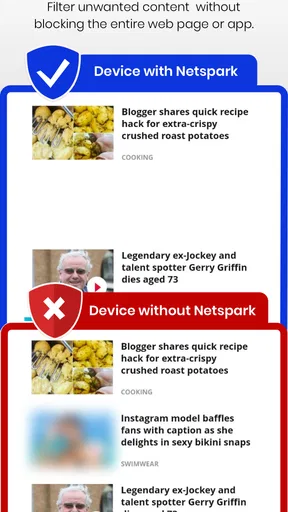
In simple terms, Netspark Real-time filter is an app designed to provide real-time filtering for web content. It’s available for both Android and iOS, and it’s all about keeping unwanted content out of sight, whether you're browsing, using apps, or just going about your digital day. It promises to be a family-friendly tool, and I've put it to the test to see if it lives up to its claims.
Installation and Setup
Getting started was a breeze. I hopped onto the Google Play Store, downloaded the app, and it was installed in no time. The setup was straightforward, with a friendly wizard guiding me through the process. It asked for the usual permissions, which are necessary for the app to do its thing. I appreciated how user-friendly it was, even for someone who's not a tech whiz.
Features that Stand Out
So, what does this app actually do? A whole lot, as it turns out. Here’s a closer look:
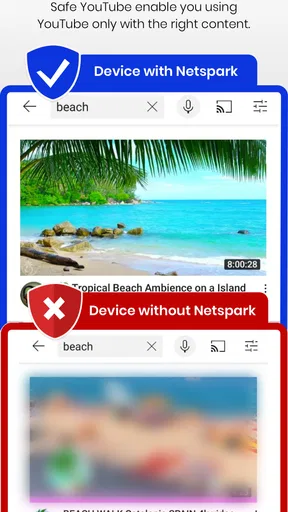
- Real-time Filtering: The app filters content as you browse, which means you don't have to worry about stumbling upon anything inappropriate. It's like having a vigilant guide as you journey through the web.
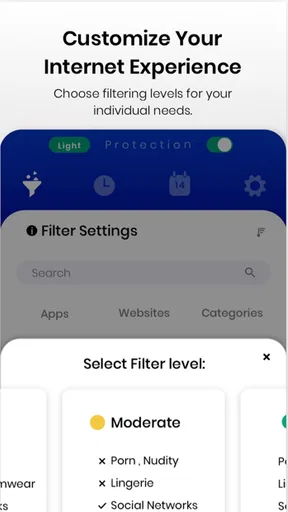
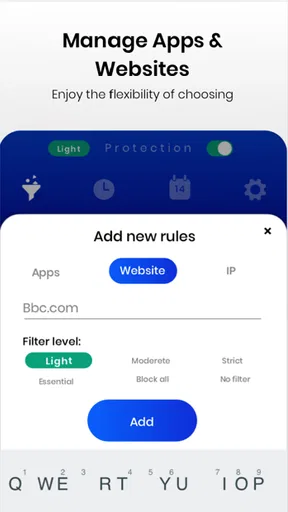
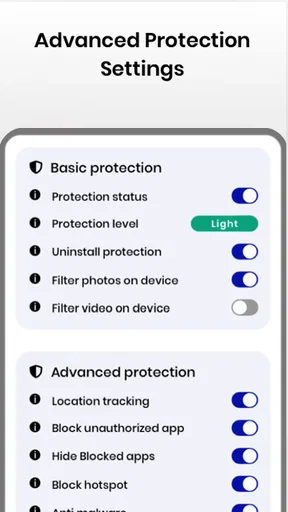
- Customizable Settings: One feature I really loved was the ability to customize filters. You can adjust settings based on what you find suitable, making it versatile for different age groups or preferences.
- App Blocking: If there are certain apps you’d rather not have opened, Netspark allows you to block them. It’s perfect for parents wanting to control app access on their kids’ devices.
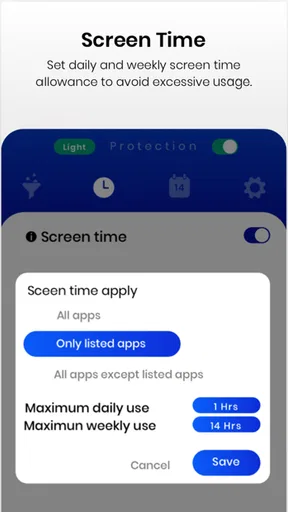
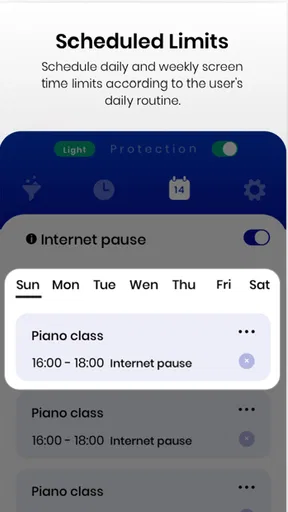
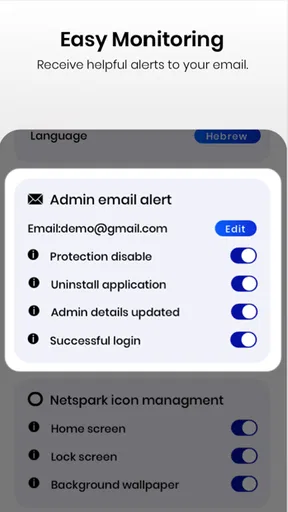
- Usage Reports: For those interested in tracking browsing habits, the app provides detailed reports. It's a nice touch for parents wanting to keep an eye on screen time and digital behavior.
Performance and Usability
Performance-wise, I was impressed. The app runs smoothly without causing any noticeable slowdown on my device. The filtering process is seamless, and it didn’t interfere with my usual browsing activities. Usability is another strong point. The interface is clean, intuitive, and easy to navigate. Even if tech isn’t your thing, you’ll find it straightforward to use.
Real-world Experience
In my day-to-day use, I found the app to be a reliable companion. Whether I was browsing news, watching videos, or exploring social media, the filter worked without a hitch. It felt reassuring knowing that potentially harmful content was being filtered out in real-time. It’s a handy tool not just for families but for anyone who wants a cleaner, safer browsing experience.
Things to Keep in Mind
While Netspark Real-time filter is a fantastic tool, it’s crucial to remember that no filter is 100% foolproof. There might be occasional slip-ups, so it's always good to stay vigilant. Additionally, some users might find the need to tweak settings to suit their specific needs, which might require a bit of trial and error.
Choosing it for your household
Netspark is a free parenting app from Internet Safety Apps, with optional in-app purchases ranging from under a dollar to just under a hundred and fifty dollars per item. Its average rating is 3 out of 5 from around 5,400 ratings, with about 81 written reviews and over 100,000 installs. Those figures suggest a product with a real audience but mixed reactions, so I would not assume it will fit every device or family routine equally well.
The app is rated for everyone, was released in 2016, and its current version is 44.31; Android 7.0 or newer is required. The age rating describes the app itself, not a promise that every filtered result is appropriate for every child. I would also check the purchase screen carefully before enabling anything beyond the free use, particularly if a child can handle the device, because optional purchases can add up and should be an adult’s decision.
Compared with built-in parental controls, Netspark’s appeal is its focus on content filtering alongside app blocking and usage reports. Built-in controls may be a better fit when a family mainly wants basic device limits or prefers to manage restrictions through the phone’s existing settings. A dedicated filtering app makes more sense when the specific concern is what a child may encounter while browsing or using apps. I would compare the actual controls available on the child’s device rather than assuming one approach replaces the other.
One useful habit is to test the setup using the same ordinary tasks the child relies on: opening a school resource, watching an age-appropriate video, or reaching a familiar site. If something important is blocked, that is a cue to review the settings instead of telling the child to work around the restriction. Likewise, if the child’s use changes from occasional supervised browsing to regular independent use, revisit the boundaries and explain what has changed. This makes filtering part of a clear routine rather than a surprise obstacle.
My household verdict
For a parent who wants a content-focused layer and is willing to maintain it, Netspark can be a practical starting point. I would be more cautious about putting it on a device used equally by adults and children without first considering how shared restrictions will feel to everyone. It is also not my first choice for families whose main need is a simple time limit, a detailed separation of user accounts, or a complete answer to online safety. No filter can replace age-appropriate guidance, and the best settings are the ones the adults can explain and keep consistent.
My recommendation is to begin with a child’s primary device, establish a few clear boundaries, and see whether the filtering and reporting fit naturally into everyday family life. If the controls cause repeated interruptions or do not match the household’s needs, compare them with the device’s built-in options or another parental-control approach. Netspark is most useful when treated as support for attentive parenting—not as a digital babysitter or a guarantee that every online experience will be safe.
Pros
- Effective real-time web filtering.
- User-friendly interface design.
- Customizable filtering levels.
- Minimal impact on device performance.
- Multi-platform support.
Cons
- Limited free version features.
- Occasional false positives.
- Requires internet connection.
- Complex setup for beginners.
- Subscription can be pricey.
FAQs for Netspark Real-time filter
What is Netspark Real-time Filter and how does it work?
Netspark Real-time Filter is a content filtering application designed to provide a safer browsing experience. It uses advanced algorithms to block inappropriate content in real-time across websites and apps. The filter can be customized based on user preferences, ensuring a personalized and secure internet experience for both children and adults.
Is Netspark Real-time Filter compatible with all devices?
Netspark Real-time Filter is available for both Android and iOS devices, ensuring broad compatibility across smartphones and tablets. However, it’s important to check the specific system requirements on the app store to ensure your device is supported. The app is continually updated for compatibility with the latest operating systems.
How can I customize the filtering settings in Netspark Real-time Filter?
Customization is one of Netspark’s key features. Users can adjust filtering levels based on age groups or specific needs. The app provides options to block or allow specific websites and content categories. Parents can tailor settings to protect children while allowing themselves more freedom, all through an easy-to-use interface.
Does Netspark Real-time Filter affect device performance or internet speed?
The app is designed to operate efficiently without significantly impacting device performance or internet speed. Its real-time filtering is optimized for minimal resource usage. However, users might experience slight slowdowns when visiting heavily filtered sites, which is a common trade-off for enhanced security.
Is there a subscription fee for Netspark Real-time Filter, and what does it include?
Netspark Real-time Filter offers both free and premium versions. The free version provides basic filtering features, while the premium subscription unlocks advanced options like detailed reporting and priority support. Subscription fees vary, so users should check the app store for the latest pricing and feature details.


